
I’m sure you all already noticed that much is changing on the site right now. But all for the better, don’t worry! 😀
First the important stuff: Reading Rooms. This is something a lot of bloggers have asked us about. These will be the places to chat with other readers about books in general or about specific book genres. Looking for new books in your favorite genre Historicals? Ask the other readers in the Historical Reading Room.
To make it really simple for you to work with these new Reading Rooms, we have a new section on the sidebar where you’ll find all the Reading Rooms in one place.
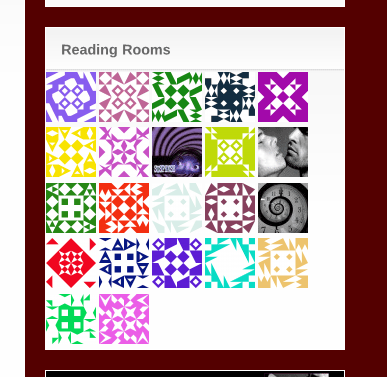
I’m still working on the icons for most of the Reading Rooms by the way. 😉 Just move your mouse over the icons and you’ll see which Reading Rooms we have prepared for you. Found one you like? Just click on it. Once you’re in a Reading Room you’ll see all the recent activity that happened there. You can join the group to stay informed about what is happening in the Reading Room. You can also start a new discussion by creating a new Topic. Or simply join the discussion about one of the existing topics.
Why not visit the Main Reading Room right now by clicking here (opens in new window).
We have some more new community features on the site. We are using BuddyPress for it, so maybe you already know how this works. If not, here’s an overview of the important features.
You can start “communicating” on the site with the new “Community” section on the menu bar above the posts.
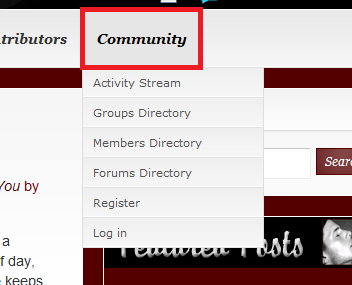
Here you’ll find the following options:
- Activity stream: All the latest activity on the site. This means posts published, comments written, forum topics created and so forth
- Groups Directory: All the groups on the site. These are groups of people interested in the same stuff and talking about it in the group forums
- Members Directory: Here you’ll find all the registered users of the site, from where you can visit their member pages or friend them
- Forums Directory: Here you’ll find all the forum topics people are talking about, so you can join the party. Or you can create a new forum topic you want to talk about with the other users
- Register: Here you can register as a user on the site
- Log in: Log in to the site with your userid
At the very top of the page you have a new menu bar which looks like this if you’re logged in:

Here is a quick overview of the features you’ll find on the menu bar after you’ve logged in:
- Activity
- Activity -> Personal: An overview of your actions on the site containing comments you left on posts, posts you published and so forth
- Activity -> Friends: An overview of the activity of users you friended on the site
- Activity -> Groups: An overview of the activity in the groups you joined on the site
- Activity -> Favorites: An overview of all activity you marked as a “Favorite” on the site. This will be a great way to “bookmark” review posts of books you found interesting.
- Activity -> @[your user] Mentions: Like with Twitter or LiveJournal you can refer to a user in posts or comments, just by putting “@admin” or “@jessewave” in the text of a comment or post. Here you’ll find an overview of all the comments or posts your user was specifically mentioned.
- Profile
- Profile -> Public: Your public profile information
- Profile -> Edit Profile: Here you can edit your profile information
- Profile -> Change Avatar: Here you can change your avatar pic
- Messages
- Messages -> Inbox: Shows your message inbox
- Messages -> Sent Messages: Shows your sent messages
- Messages -> Compose: Here you can send a private message to another user. The receiving user will be notified by email of the new message.
- Friends
- Friends -> My Friends: Here you’ll find all the users you friended on the site
- Friends -> Requests: Here you’ll find requests of users who want to friend you
- Groups
- Groups -> My Groups: Here you’ll find all the groups you joined
- Groups -> Invites: Here you’ll find invitations to groups a user sent you
- Settings
- Settings -> General: Here you can change your email address and your password
- Settings -> Notifications: Here you can choose how you want to be notified by email in addition to getting a notification in your message inbox
- Settings -> Delete account: Here you can delete your user account which we hope you’ll never do ^^
- Settings -> Log out: Here you can log out of course 😉
- Notifications: Here you’ll find all new notifications you received. If you have one it looks like this:

- Visit
- Visit -> Random menber: Just visit a random member’s page
- Visit -> Random group: Just visit a random group

A big, big thanks for all her work on the style of the new community pages and the rest of the site goes to Lynn. :bravo: :kiss: This site would not look as beautiful without her. :ugly:
With this little green fellow we already arrived at another new installment on the site: Green balls
 …and lots of them!
Sometimes their presence gets a little bit overwhelming, even for me. :ahhh: Though I’m by no way their creator. These green smilies were made by Michael Niedermayr, who was born in Austria and is now living in Germany. Here is a link to his site for anyone who’s not afraid to find even more green balls and speaks at least a little bit German. 😉

But the green balls on this site also have some surprises in store for you, so stay tuned. ^^ And maybe some day I’ll even grant Wave her wish and install blue balls on the site. 
Next we have a new message board on the sidebar, which is still in the test phase. The layout needs working on, because right now the message board takes up way more space on the sidebar than the old one. But in regard to functionality the new message board beats the pants off of the old one:
- The board is integrated into the WordPress system, so if you’re already registered on the site you can use the same userid to leave a message on the board.
- The look and feel of the board is the same as with the comments on a post, even the avatar is the same.
- You can use the green balls on the message board, though you have to type them in like “:)” or “;)”. :hurrah:
- The board reloads automatically, so when a new message is posted, the tab of your browser changes to “New message from xxx” and you’ll hear a plopping sound.
- If you reply to a comment on the message board, the author of the message you replied to is notified by email.
And last, but not least, I have decided to differentiate my admin activities on the site from those made by me as a “normal” user by using a new avatar for my admin user. ^^

That’s all folks! 😀
















Oh my more things to do on this site. The reading rooms are very cool. Great idea who ever suggested them! 😎
I’m very excited to see how they work out. 🙂
I have tried to register but the system wont let me. It keeps giving me a message under username that only lower case and numbers are allowed. I’ve tried everything, but it wont let me register. Any ideas? 😕
Did you put spaces in your username, like “lisa s”? That’s not allowed either. 😉
Thanks got it. 🙂
Christian
As always, a fantastic job on these enhancements to the site. The readers came up with the idea of a Reading Room so I know that a lot of use will be put to them now that they have so many. 😯
I must register in the nostalgic/old favourites; cowboys; shifters; damn I’ll never get any work done.
How much am I paying you again? There will be a raise in your paycheck. 😀
Thanks for always letting me play around with this site, Wave. :computer: Right now I’m fiddeling in the database. :geek2:
These are completely awesome, Christian! Thank you for all your work (and Lynn, too) 😀 😀 yay green balls!
No problem, Leslie. Glad you like the green balls. ^^
I want blue balls!!!!! :sex4:
eeeh Wave, I am almost sure that some guys won’t agree with you :XD:
Right you are, Ingrid. 😉
Really, Wave? 😯 I mean…REALLY??? 😕
Thank-you Christian, Lynn, and Wave!
This site is my new favourite place. :hurrah:
Awesome job guys. :bravo:
Great to hear that, Jaime. You are always welcome here. 🙂
Thanks for all of your hard work, Christian! I do very little compared to you. 😉
We both now that’s not true, Lynn. 🙂 I’m glad to have you here by my side. The only other person around here who understands what I’m talking about. :geek2: 😉
:happydance: Looking forward to wallowing in y’alls awesomeness!!
It’s great, isn’t it? Now no comment goes unnoticed anymore. 😉
You guys are great; such wonderful collaboration. I’m going to need summer break to be able to play with all the new gizmos and gadgets! 😀
You’re right there, Patty. 😉
Some great changes, congratulation – but was I the only one to have trouble finding the link to register/log in? Why is it tucked away at the bottom?
That’s just temporary, liade. There should also be an admin bar at the very top of the page for not logged in users, but we are having problems with it. So the admin bar is only there for logged in users right now. But there’s also a log in and a register link in the “Community” section of the menu right above the sidebar. 🙂
Good work guys 🙂 I hope the rooms will be buzzing :flowers:
May I suggest one more reading room pretty please??? A “yaoi” one??
Sure thing, Ingrid. I just created the new Yaoi Reading Room. 🙂
Thank you very much for all your hard work :bravo:
OMG There are tons of green balls 😮 Got now a big bunch keeping me company in my computer 😆
Yes, there are a lot green balls. The creator on his site has 4.135 different ones altogether. 😮
Christian and Lynn, you all :god: are AWESOME!!
I’m skeerd of gizmos and gadgets, so hope everyone will be merciful as I comment in wrong places or other foolishness. :blush:
No problem, Reggie. Just leave your comments where ever you like. 😉
Woah the site is really growing and getting bigger! How cool and how different from a few years back!
Good work guys! 🙂
Okay, I think I get most of that – even if I’m not sure I’ll ever use most of it… 😉
One thing I wondered – are the reading rooms meant to be something authors stay out of? I seem to remember something to that effect when they were first mentioned.
Hi Jo
A few of the readers felt a bit constrained by authors entering the discussions when their books were discussed but I don’t think that will be a problem here. We discuss books all the time on the site and there has been nothing negative. 😯
Great stuff, Wave! I have trouble reading your site with IE, so I’ll need to remember to change to Mozilla Firefox when I visit here, to take advantage of these changes. Does anyone else have that problem?
I use IE gaycrow and have no problems.
Thanks, Jaime. Maybe it’s my computer. Works fine with Firefox, though. I just need to nudge my brain to change over. Or maybe I should just stick with Firefox all the time. 😕
I have the same problem with IE but Firefox works fine.
Wow, this is great! Thank you so much Christian, Lynn and Wave for all your hard work! :bravo:
With all those new features, especially the reading rooms, I’ll have even more probs finding time to actually read…
Nice feature, Wave! What I wish you still had is the list of recent posts on the upper sidebar. I’m too impatient to scroll and scroll, so I’ve no doubt missed out on a lot of good stuff because that at-a-glance clickable list is no longer there. 🙁
KZ
The list is still there except it’s behind a link. If you click on “Archives” on the secondary menu just below the header, the 30 most recent posts are displayed, and then posts by month.
Wow! Like I didn’t spend enough time here already. 😀 So much too look at. So many rooms to explore. Thanks so much for all the hard work you all put in to this site. It (and youse) are the BEST! :bravo:
Yayness :great: New playrooms and green balls to enjoy. Thanks again to all who make this site possible. :2thumbs:
Christian, these things look amazing! I just need to get the time to explore them in depth, but I’m so glad you put the time into doing this. Thanks again! 😀
:god: Wave, Christian & Auntie Lynne…you guys have taken good and turned it into amazing!! Once again, thank you so very much for everything you all do to make this such an awesome place! :bravo: :hurrah:
(hehe, yea I’m lovin the green balls!)